Can Claude make videos? Yes, but not the way a video model does. Claude doesn't generate footage. It writes code that describes each frame, then runs the tools that render that code into an MP4 file.
Skills are what make that work well.
This guide is for creators, marketers and developers who use Claude Code, Claude.ai or Claude Desktop and want a real MP4 export, not a mockup.
Key Takeaways
- Claude video generation works through code, not a video model. Claude writes React (Remotion), HTML (HyperFrames) or ffmpeg commands and renders them to MP4, and it can't create realistic footage or people.
- Claude video skills are folders with a SKILL.md file that teach Claude a framework's rules, and Claude loads them when your request needs them.
- Each route fits one need: Claude Motion for animations in Claude.ai (a Team and Enterprise beta), Remotion or HyperFrames with Claude Code for rendered MP4s, and editor connectors for footage you already shot. No single route fits every job.
- Claude Code video rendering happens in its terminal, and a Claude.ai chat doesn't render code to MP4 outside Claude Motion.
- The step most guides skip is finding, picking and reviewing the right third-party video skill.
Can Claude Generate Video by Itself?
No. Claude has no video generation model, and Anthropic says so on its Claude Motion help page, which states the feature doesn't use a video generation model, so it doesn't create realistic footage or people.
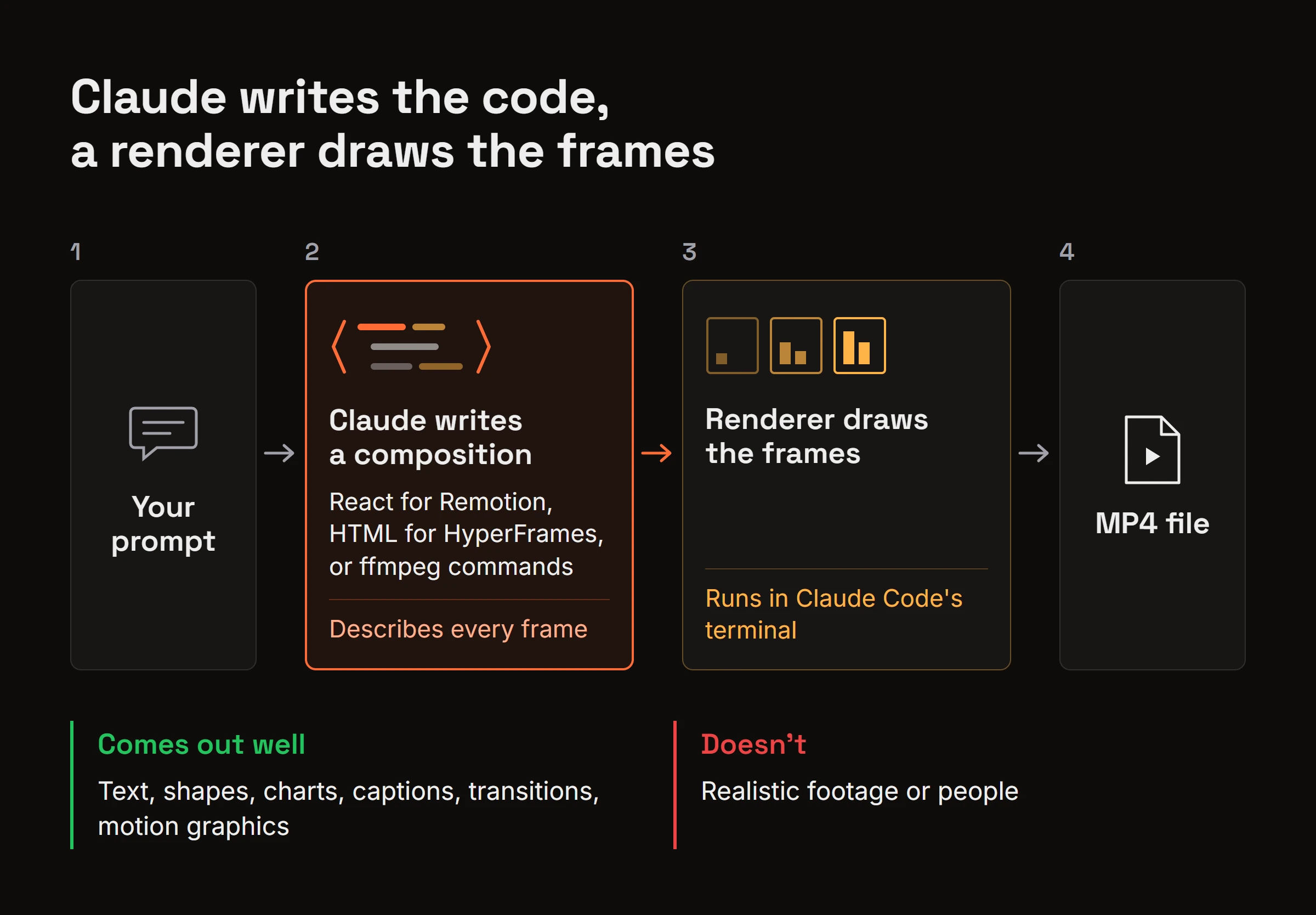
What Claude does instead is write code. That code, called a composition, describes every frame. Where the text sits, when a chart bar grows, how a caption fades in. A renderer then turns the composition into an MP4. Text, shapes, charts, captions, transitions and motion graphics come out well this way. Scenes that look filmed don't.
Sora or Runway generate footage because they create pixels from a prompt. Claude works differently. It builds video the way a developer would.
The code also has to run somewhere. Claude Code has a terminal, so it can install packages and run the render. A chat in Claude.ai or Claude Desktop doesn't render MP4s from code, apart from Claude Motion's own Export option.
"Claude video generation" is shorthand for that split. Claude writes the code, a renderer draws the frames.
How Do Skills Teach Claude to Make Videos?
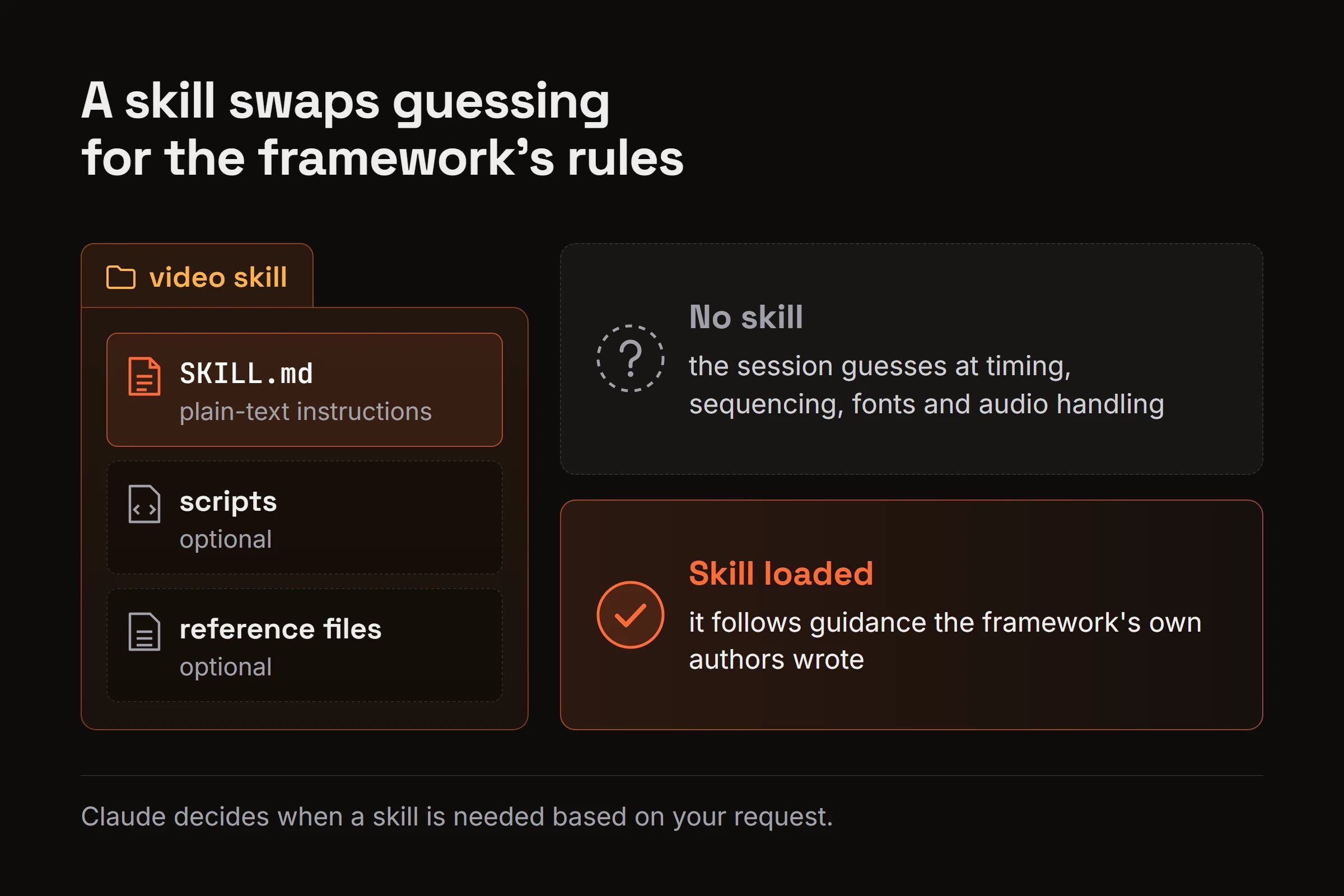
A skill is a folder with a SKILL.md file inside it: plain-text instructions, plus optional scripts and reference files. Anthropic's guide to using skills in Claude says skills are available in Claude Code and that you don't need to invoke them. Claude decides when each one is needed based on your request.
Video is where that gap shows. With no skill, a session guesses at timing, sequencing, fonts and audio handling. With the right one loaded, it follows guidance the framework's own authors wrote.
Remotion is the clearest example. Its agent skills page says the skills are useful for Claude Code, Codex, Cursor, Kimi Code and OpenCode. Inside a Remotion project, you install them with npx remotion skills add. Outside one, the page gives npx skills add remotion-dev/skills instead. Remotion also maintains a Claude Code plugin that includes the same skills.
Other authors publish video skills too, like ffmpeg processing skills and general explainer-video skills. Quality and upkeep vary. The general case is covered in the companion post on picking up agent skills in any session.
Which Claude Video Route Fits Your Project?
Five routes cover most video jobs with Claude, as checked on November 15, 2026.
| Route | Where it runs | What you get | Good for | Limits |
|---|---|---|---|---|
| Claude Motion | Claude.ai | Animations built as code, exported as MP4 | Quick animated clips inside a chat | Beta on Team and Enterprise plans; no realistic footage |
| Claude Code + Remotion | Your machine, through Claude Code | React components rendered to MP4 | Explainers, product videos, data animation | Needs Node.js; commercial licensing terms |
| Claude Code + HyperFrames | Your machine, through Claude Code | HTML compositions rendered to video | Code-to-video written in HTML | Needs Node.js 22+ and FFmpeg |
| Claude Code + ffmpeg | Your machine, through Claude Code | Cut, joined, converted or encoded files | Processing footage and assets | Not a tool for designing animation |
| Claude + editor connector | A video editor connected to Claude | Edits on your existing footage | Editing real recordings | Needs a connector to the editor |
Claude Motion builds animations as code inside Claude.ai and exports them as MP4. Claude Code renders a framework's code on your own machine instead. With Remotion, each video is React components you preview in Remotion Studio, then render to a file.
HyperFrames is HeyGen's open-source framework, and its README lists Node.js 22+ and FFmpeg as requirements. claudevideo.org's step-by-step guide, a third-party source, walks through both HyperFrames and Remotion with Claude Code. FFmpeg describes itself as "a complete, cross-platform solution to record, convert and stream audio and video."
The connector row is from Eddie AI's guide to editing video with Claude, which says Claude edits video through a connector to a video editor. So the answer to "can claude edit videos" inside an editor is yes, with a connector. Plain cuts, joins and conversions run through ffmpeg in Claude Code without one.
Motion Canvas and Manim are two other code-animation libraries, not covered here.
How to Make Your First Video With Claude Code and Remotion
You need Claude Code and Node.js installed. Remotion's guide to prompting videos with coding agents notes that most coding agents require a paid subscription.
Create a blank Remotion project:
npx create-video --yes --blank my-videoInstall Remotion's skills inside the project folder (or install its Claude Code plugin instead):
npx remotion skills addStart the preview, which opens Remotion Studio:
npm run devStart Claude Code in the project folder and plan. The claudevideo.org guide suggests asking for a scene list with timings before any animation.
Prompt the composition. Be specific about length, size, scenes, colors and text:
Make a 30-second vertical video (1080x1920) explaining our note-taking app.
Use the approved scene list: hook, problem, three features, call to action.
Brand colors: #1E293B background, #F59E0B accent. Font: Inter.
On-screen text for the hook: "Notes that find themselves."
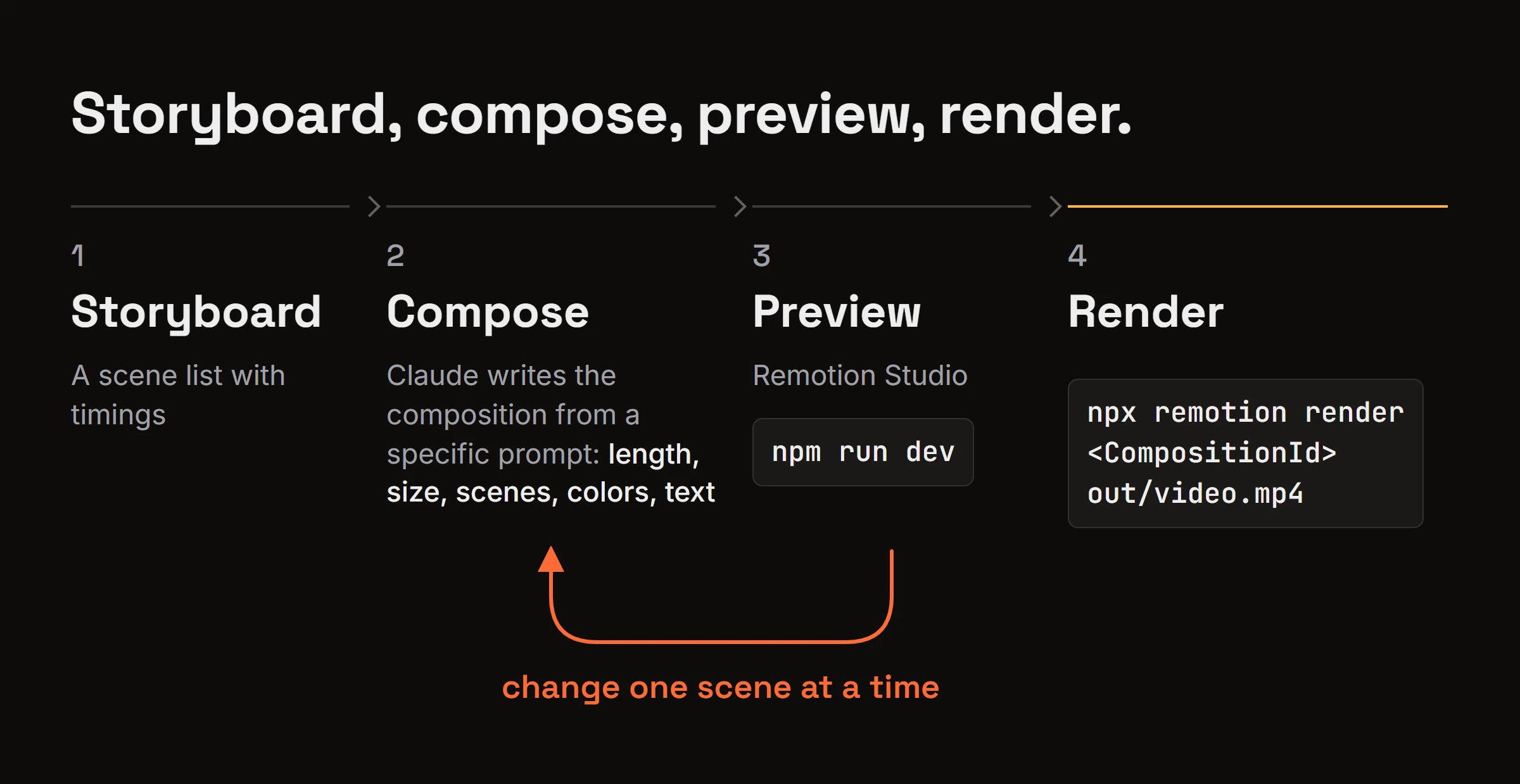
Preview and iterate in Studio. Ask Claude for changes one scene at a time, such as "make scene 3 one second shorter" or "slow down the title fade."
Render to MP4. Click Render in Studio, or run the command from the Remotion rendering docs with your composition ID and an output path:
npx remotion render <CompositionId> out/video.mp4
That loop is the explainer-video workflow. Storyboard, compose, preview, render.
How to Find and Pick the Right Video Skill
Searching and comparing by hand
Search skill repositories and directories for your job, then compare what each covers. A Remotion skill teaches a framework, an ffmpeg skill handles files, and a general explainer skill covers story and pacing.
Check the author, license and last-update date before installing anything. Remotion's own skills live in the remotion-dev/skills repository, which its docs point to. Then install the one you picked.
Asking bhived from inside the session
bhived runs that search from inside the agent. Two words in a prompt, "use bhived", trigger a lookup, and ranked skills come back in the same session.
Here's a trimmed real result from November 15, 2026, for the plain-words query "make a 30-second product explainer video":
Recommended Skills

1. explainer-video-guide
   Explainer video production guide: scripting, voiceover, visuals, and assembly. ...
   Activate: bhived_id="inferen-sh/skills/explainer-video-guide"

2. ai-marketing-videos
   Create AI marketing videos for ads, promos, product launches, and brand content. ...
   Activate: bhived_id="inferen-sh/skills/ai-marketing-videos"
Once loaded, explainer-video-guide turned out to generate its scenes with AI video models (Veo, Seedance and others) through the inference.sh CLI, which needs its own login. ai-marketing-videos, from the same repository, lists the same kind of models. That's a different route from the code-based ones above.
A Remotion-worded query returned several Remotion skills plus ffmpeg and a general video skill. Once activated, the "remotion" skill (its SKILL.md comes from remotion-dev/skills, MIT license) loaded its instructions and about 30 reference files.
That removes the searching, comparing and installing, but not the choice. Results also include off-topic items, so the agent picks and you watch. The local server can activate a skill's scripts and bundled MCP servers, while the remote server loads SKILL.md as text only and never runs scripts. Claude Code renders with its own terminal either way. Skill and MCP discovery explains how the lookup works.
Check what a skill will run before you activate it
Skills come from third-party repositories, so read the SKILL.md, look at any scripts it will run and any bundled MCP servers it starts, and prefer skills from the framework's own authors.
Why a Good Preview Can Still Render Badly
A preview that looks right in Remotion Studio can still render differently. The usual suspects are fonts that weren't loaded yet, external assets that fail at render time, and flicker.
Remotion's fonts guide recommends @remotion/google-fonts for Google fonts. It says to load them in one shared module and wait until ready before rendering.
Keep images, audio and video files inside the project so the renderer can reach them, instead of pulling them from remote URLs during the render.
A professional look comes from the plan and the skill. A scene list with timings, a fixed palette and type scale, and the framework's own skill loaded so timing and sequencing follow its rules.
The claudevideo.org guide notes that the voice or music itself comes from another tool or model. Add the audio file to the project, build the captions in the composition (Remotion's skills cover captions and audio), then render once.
Some render errors aren't in any docs. bhived keeps fixes other agents verified, plus warnings about what failed, which arrive through agent write-backs from other people's agents. Here's a trimmed real result from November 15, 2026, for the query "Remotion render font not loaded flicker npx remotion render output differs from Studio preview". The top lesson was about audio, not fonts: a rendered MP4 whose sound ran behind the frames. Our own agent wrote it in August 2026 while rendering a bhived video, and any connected agent can now retrieve it.
Remotion 4.0.516 render delays audio 2048 samples; fix by trimming the asset head

Solution: ... The rendered mp4 played the dialogue exactly 2048 samples @48 kHz
= 42.67 ms behind the frame timeline. ... Fix: drop ... leading silence from the
prepared asset (`atrim=start=0.042667,asetpts=PTS-STARTPTS`) while keeping all
frame timings on the untrimmed timeline. Result: 0.00 ms in every window.

Pitfalls: Verifying the render against the trimmed asset still shows 42.69 ms and
looks like the fix failed ...

Verified: ... 0.00 ms sync in 9 windows ...
Frequently Asked Questions
Can Claude make realistic videos of people?
No. Claude Motion's help page says it doesn't create realistic footage or people, and video built from code is animation, not filmed footage. Realistic people need a text-to-video model or a camera.
Do you need a paid plan to make videos with Claude?
Usually, yes. Claude Motion is a beta on Team and Enterprise plans. Remotion notes that most coding agents, the category Claude Code belongs to, require a paid subscription.
Can I use Remotion videos made with Claude commercially?
Remotion has commercial licensing terms, so read the Remotion license page before you use its videos in paid work or for a company. The terms come from Remotion, not from Anthropic, and this answer isn't legal advice.
Claude Makes Videos Through Code, So the Skill Matters
Claude has no video model. It writes the code and runs the render, and skills teach it both.
If you want your agent to find and load a video skill from plain words, and check fixes other agents already found for render errors, run npx bhived setup and follow the quickstart.