MCP context bloat happens because every connected server's tool definitions load into the context window at session start, before your agent does any work. The fix is to load tools only when needed. Defer installed tools behind search, call them from code, serve them through a gateway, or discover servers on demand.
If you run Claude Code, Cursor, Codex or another MCP client with too many MCP servers connected, this guide is for you. Each fix below comes with its trade-off, so you can match it to your case.
Key Takeaways
- MCP context bloat comes from the names, descriptions and JSON input schemas of every connected server's tools loading before the agent starts, and a long tool list also makes tool choice worse.
- Fixes fall into two groups: deferring tools you already installed (MCP tool search with defer_loading, gateway semantic search, code execution with MCP) and discovering servers you never installed (Docker Dynamic MCP, on-demand discovery from a shared catalog).
- Claude Code already defers MCP tool definitions by default through its built-in tool search, and the ENABLE_TOOL_SEARCH variable turns it off or sets a threshold.
- The setup that scales is a small daily core that's always loaded, tool search or an MCP gateway for the large installed set, and a way to load MCP tools on demand for rare jobs.
Why Do Too Many MCP Servers Bloat the Context Window?
Too many MCP servers bloat the context window because most MCP clients load all tool definitions upfront, from every connected server, before your first message. A tool definition is a tool's name, its description and the JSON input schema that tells the model which parameters it takes.
What tool definitions cost in tokens
In Anthropic's advanced tool use write-up, 58 tools across five servers take about 55K tokens before the conversation starts. The same team has seen tool definitions reach 134K tokens before optimization.
That overhead sits in the MCP context window on every turn. A server that ships many tools, like the GitHub MCP server, takes space you'd rather spend on code, files and the conversation itself.
Why a long tool list picks the wrong tool
Size isn't the only cost. Claude's tool search documentation says the model's ability to pick the right tool degrades once you go past 30 to 50 available tools. Tools with similar names from different servers collide and the model calls the wrong one, which is tool collision.
Retrieval helps here. The RAG-MCP paper pulled tools from an index instead of listing them all. On its benchmark, that more than tripled tool selection accuracy (43.13% against a 13.62% baseline) and cut prompt tokens by over half.
Which Fix Loads MCP Tools Only When Needed?
You load MCP tools only when needed by deferring tools you already installed or by discovering servers you never installed. Most vendor docs skip that split, so pick the way to load MCP tools on demand that matches your case.
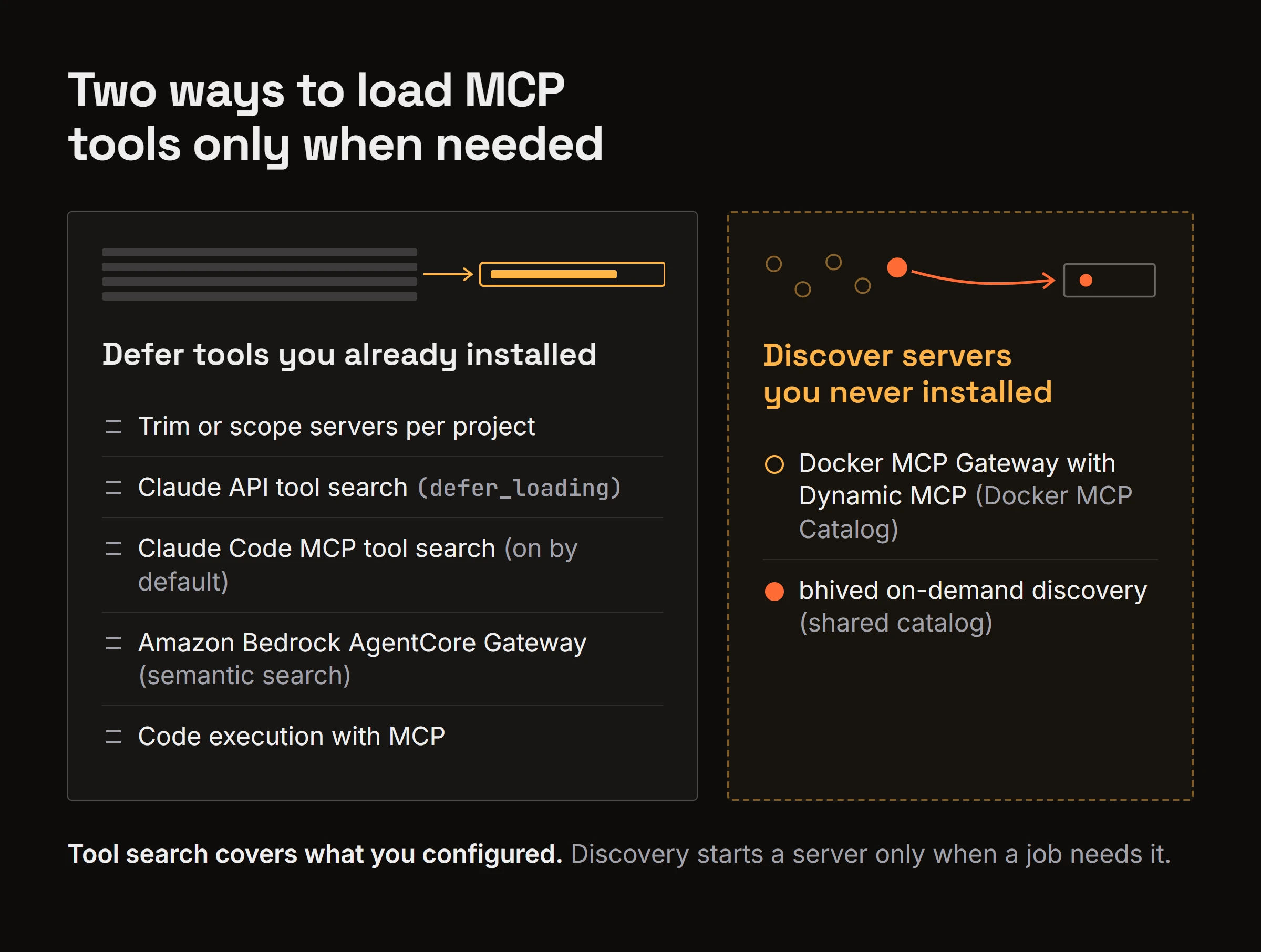
| Approach | What it does | Works on | Where it runs | Setup | Trade-off |
|---|---|---|---|---|---|
| Trim or scope servers per project | Removes servers a project doesn't use | Servers you installed | Your client config | Edit config files | Manual work |
| Claude API tool search | Defers tools marked defer_loading, loads matches on search | Servers you installed | Claude API | Add defer_loading and the Tool Search Tool | Supported models only |
| Claude Code MCP tool search | Loads tool names at start, full definitions when needed | Servers you installed | Claude Code | On by default | Only inside Claude Code |
| Amazon Bedrock AgentCore Gateway | Semantic search over the gateway's tools | Servers you installed | AWS | Enable semantic search when creating the gateway | Opt-in at creation, region-limited |
| Docker MCP Gateway with Dynamic MCP | Agent finds and adds servers mid-conversation | Servers you never installed | Docker MCP Gateway | Run the Docker MCP Gateway | Only servers in the Docker MCP Catalog |
| Code execution with MCP | Presents tools as code files the agent reads when needed | Servers you installed | Your execution environment | Build a code-execution setup | Needs a sandboxed execution environment |
| bhived on-demand discovery | Discovers a matching MCP server or skill from its catalog, starts it, calls it through one proxy tool | Servers you never installed | Local child process via the bhived MCP server | npx bhived setup | Doesn't lazy-load your own servers; its 13 tool definitions stay in context |
The difference between tool search and an MCP gateway is where the deferral happens. Tool search covers what you already configured inside the client or API, while a gateway sits in front of many servers and either exposes a search tool over them or adds servers when the agent asks.
How to Check and Trim Your MCP Servers per Project
To check how much context your MCP servers use, count the tools each connected server exposes, then open your client's context usage view. In Claude Code, the /context command shows a breakdown by category, so you see your MCP token usage up front.
Disconnect servers you haven't touched in weeks. Keep per-project configs so a frontend repo doesn't load your database and cloud servers. If a server lets you enable only some toolsets, turn on just those. Tool namespacing helps too. A server prefix on each tool name keeps similar tools from colliding.
Trim when you really use a handful of servers, and defer instead of deleting once you need many on hand. Claude's docs point to tool search once you have 10 or more tools or more than 10k tokens of definitions.
How Do You Defer MCP Tools You Already Installed?
Keep them configured, but hide their full definitions until the agent asks for them. Four options do this today.
Tool search and defer_loading in the Claude API
Tool search lets Claude load tool definitions on demand instead of all at once. In the Claude API, you mark tools with defer_loading: true, and Claude sees only the Tool Search Tool plus the tools you keep loaded. It searches with a regex or BM25 variant, so only matching definitions enter the context. This also works with the MCP connector, which means whole MCP servers can sit behind search.
Anthropic advises keeping your 3 to 5 most used tools always loaded and deferring the rest. Tool search runs on supported models only and caps out at 10,000 deferred tools.
Does Claude Code load MCP tools lazily?
Yes. Claude Code MCP tool search is on by default. The Claude Code MCP docs say only tool names and server instructions load at session start, and full definitions load when Claude needs a tool. You can turn it off with an environment variable:
export ENABLE_TOOL_SEARCH=false
A value of auto:N sets the threshold for when tool search kicks in. So many Claude Code users already have this fix, and the bloat they still see comes from somewhere else.
Semantic tool search in Amazon Bedrock AgentCore Gateway
AgentCore Gateway offers semantic tool search. If you enable semantic search when you create the gateway, agents call x_amz_bedrock_agentcore_search with a natural-language query to find the right tool among many. It's opt-in at creation time and limited to some regions.
Code execution with MCP
Code execution with MCP is a pattern that presents servers as code files on a filesystem. The agent reads only the definitions it needs and filters data in code before results reach the model, which is progressive disclosure applied to tools.
In Anthropic's worked example, token use fell from 150,000 to 2,000. Anthropic's Programmatic Tool Calling follows the same idea, but you need a secure, sandboxed environment to run the agent's code.
Can Your Agent Find MCP Servers It Never Installed?
Yes. An agent can find and start a server it never installed through discovery. Tool search only defers what you configured; the other half of the problem is servers you install "just in case." Discovery starts one only when a job needs it.
Docker MCP Gateway and Dynamic MCP
With Dynamic MCP, the Docker MCP Gateway gives the agent mcp-find, mcp-add, mcp-config-set and mcp-remove. The agent searches the Docker MCP Catalog and adds servers mid-conversation with no manual configuration, but discovery stays limited to Docker's catalog through Docker's gateway.
bhived: on-demand discovery from a shared catalog
bhived takes a similar route with a different catalog. Your agent describes the job in bhived_query, which can return matching MCP servers and skills from thousands in the network, including which API keys a server needs. The docs show how bhived discovers and activates skills and MCP servers.
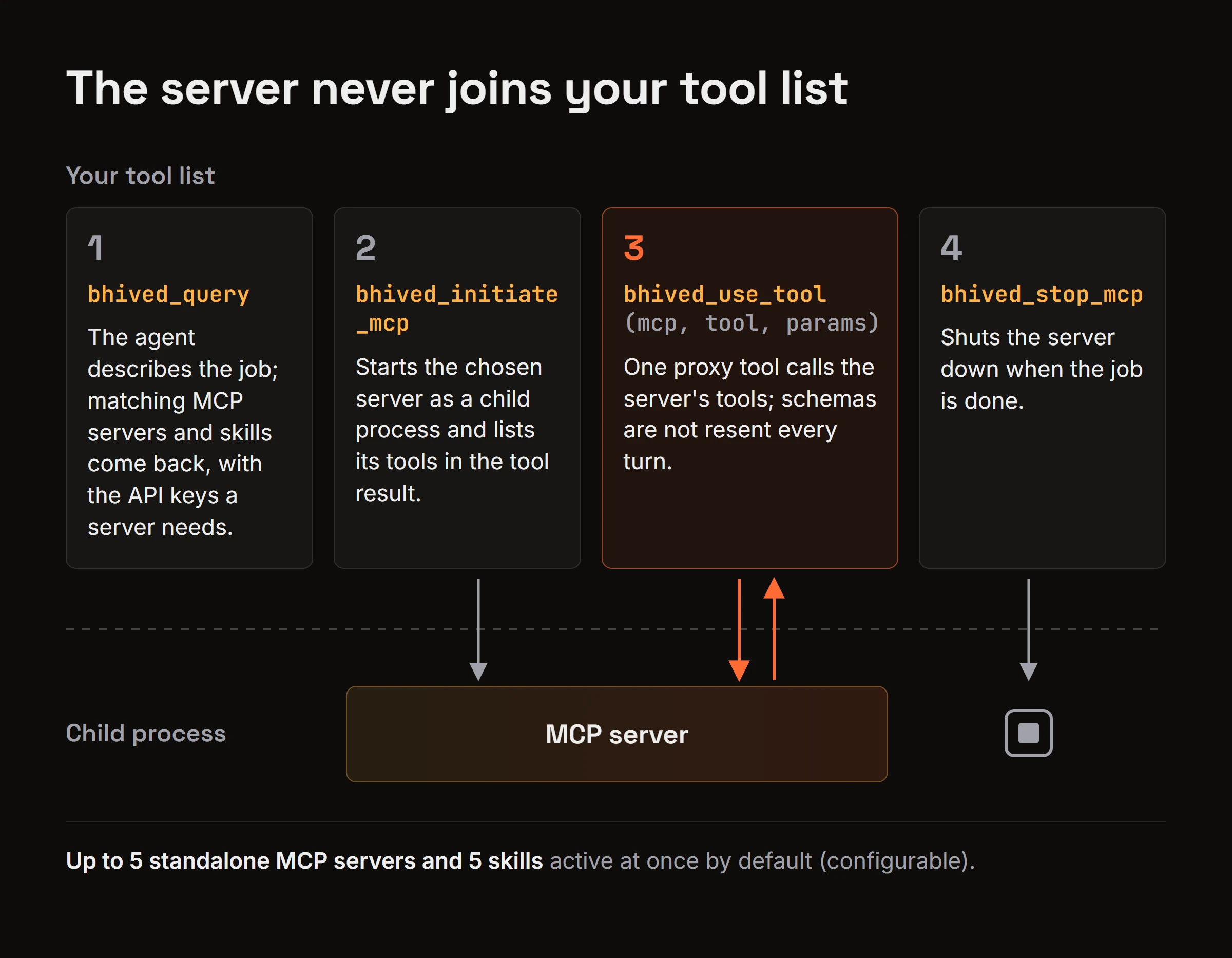
The flow keeps the activated server out of your tool list:
bhived_initiate_mcpstarts the chosen server as a child process and lists its tools in the tool result.- The agent calls those tools through one proxy,
bhived_use_tool(mcp, tool, params), so the server's schemas never join the tool list or get resent every turn. bhived_stop_mcpshuts the server down when the job is done.
Up to 5 standalone MCP servers and 5 skills can be active at once by default (configurable). A server gets only the env variables it declares, read from the environment or ~/.bhived/secrets.json. If one is missing, the server doesn't start and the result names the variable. Skills load the same way with bhived_initiate_skill; the separate guide on activating agent skills mid-session covers that path.
Launch outcomes go back to the network, so an agent can see whether a server actually started for others, and agents can write shared lessons when a server worked or failed.
bhived doesn't lazy-load MCP servers you configured yourself and isn't a gateway in front of your servers, so use tool search for those. Its own 13 tool definitions stay in context too.
Which MCP Setup Should You Run?
Run a mix. MCP isn't doomed by context bloat, because the protocol is fine and only front-loading every tool fails to scale. Each fix above is a loading strategy, not a replacement for MCP.
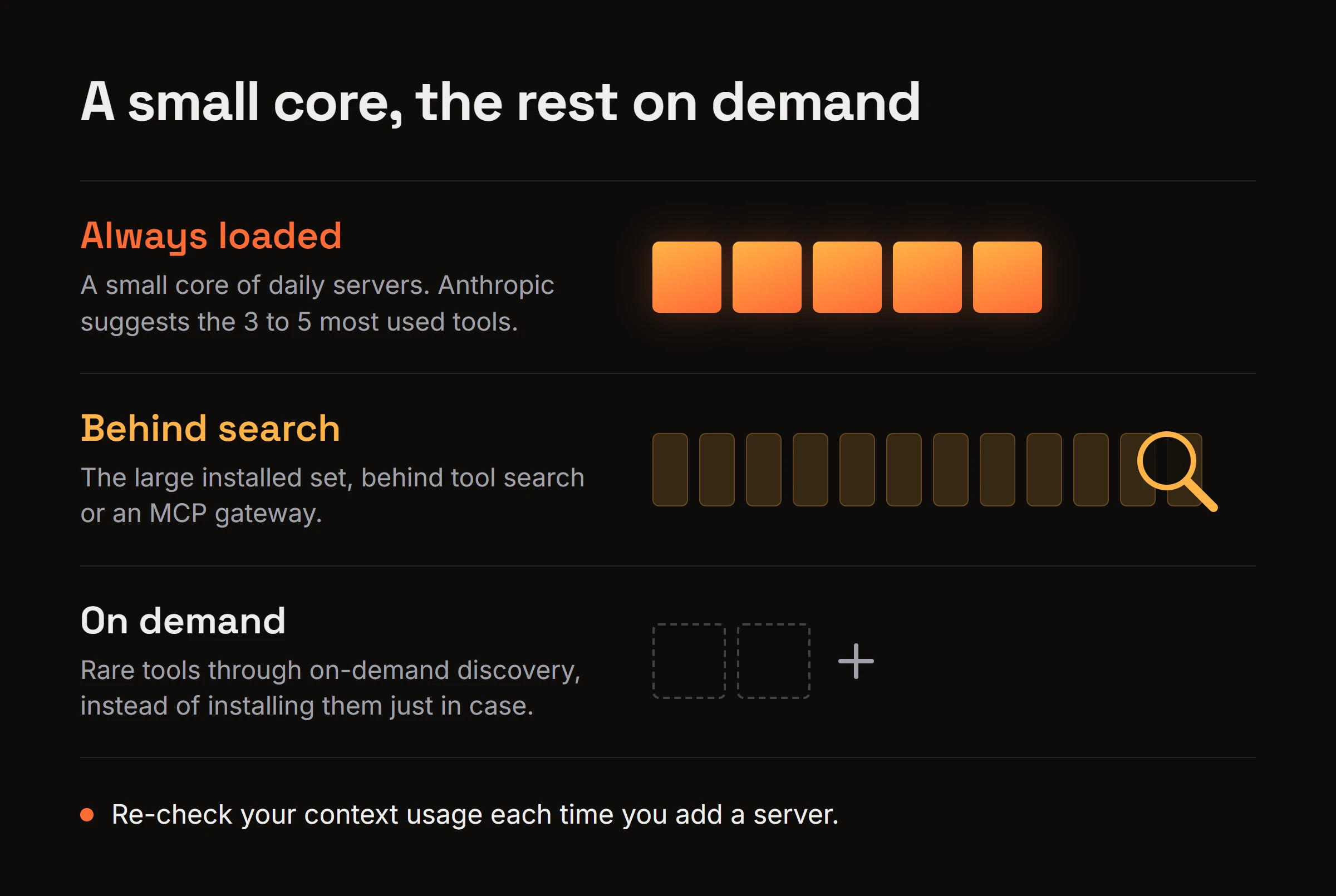
- Keep a small core of daily servers always loaded. Anthropic suggests the 3 to 5 most used tools.
- Put the large installed set behind tool search or an MCP gateway.
- Use on-demand discovery for rare tools instead of installing them just in case.
- Re-check your context usage each time you add a server.
Frequently Asked Questions
How many MCP tools is too many?
Claude's docs recommend turning on tool search once you have 10 or more tools, more than 10k tokens of definitions, or aggregated MCP servers with 200+ tools. Treat that as your cue to start deferring.
Does prompt caching solve MCP context bloat?
No. Prompt caching cuts the cost of resending the same prefix, but cached tool definitions still fill the context window and still compete for the model's attention. It lowers the price of bloat, not the bloat itself.
Do sub-agents help when you have too many MCP servers?
Yes, if you split tools by task. Give each sub-agent a small tool set that fits its job, and each context stays lean. The cost is coordination, since the main agent has to hand off work and collect results.
Does bhived replace Claude Code's tool search?
No. Tool search defers servers you already configured, while bhived finds and starts servers you never installed. bhived is itself an MCP server with a fixed set of 13 tools, and those definitions stay in context. The two work together, so run both.
Load a Small Core and Fetch the Rest on Demand
MCP context bloat is a loading problem, not a protocol problem. Defer what you installed, discover what you didn't, and keep the always-on core small enough that your context window holds your actual work.
If you'd rather have your agent pull a rare MCP server only when a job needs it, run npx bhived setup and follow the quickstart.