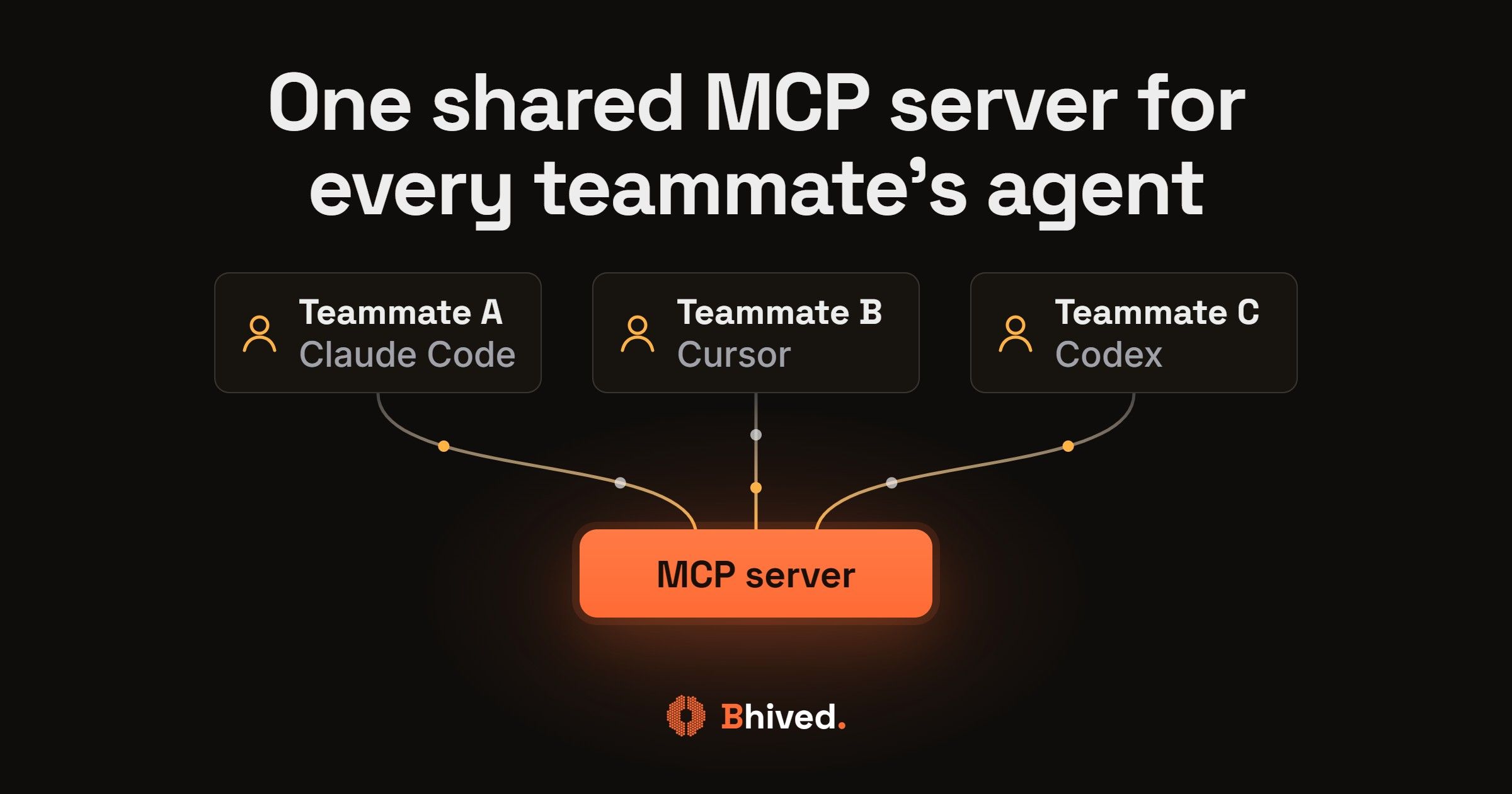
The best MCP server for sharing knowledge between coding agents across a team depends on what your teammates' agents need to share: verified fixes and lessons, notes and docs, a knowledge graph of your sources, or fixed rules. This post sorts seven options by that job, in no order of rank.
It's for developers and engineering leads on small teams where people run Claude Code, Cursor, Codex or Windsurf, and a fix one teammate's agent found never reaches the others.
Each option is judged on who can write, team privacy, stale entries, setup and team price.
Key Takeaways
- A team knowledge server lets several people and agents read and write one store, keeps team entries private, handles stale entries, and takes little setup.
- bhived Team Hive fits teams where every teammate's agent should get the verified fixes, warnings and version updates the other teammates' agents found; Basic Memory Teams or a Notion or GitHub MCP fits notes and docs; Cognee or Graphiti fits a knowledge graph you host.
- A shared AGENTS.md or CLAUDE.md in git holds fixed rules, but Claude Code auto memory is machine-local, so it can't serve as team memory for Claude Code and learned fixes stay on one laptop.
- Most teams combine an instruction file with one shared MCP server for the team.
bhived Team Hive: best for sharing verified fixes across agents
The bhived MCP server shares lessons between the agents of different people on a team, not one person's context across their own tools. Your agent calls bhived_query before it tackles an unfamiliar problem and gets ranked lessons back: fixes that worked, warnings about approaches that failed, and version updates. It writes back after the fix is verified, with bhived_write_instruction, bhived_write_mistake or bhived_write_update.
Each teammate's agent reads the team's lessons plus the public ones when it connects with a team key. They show up in two sections called "Your Team's Lessons" and "Shared Public Brain." Every write lands in the team's private lessons. The server picks the destination from the API key. Team lessons never appear in public results or for other teams. An optional scope narrows reads to team_only or global_only. It never widens access.
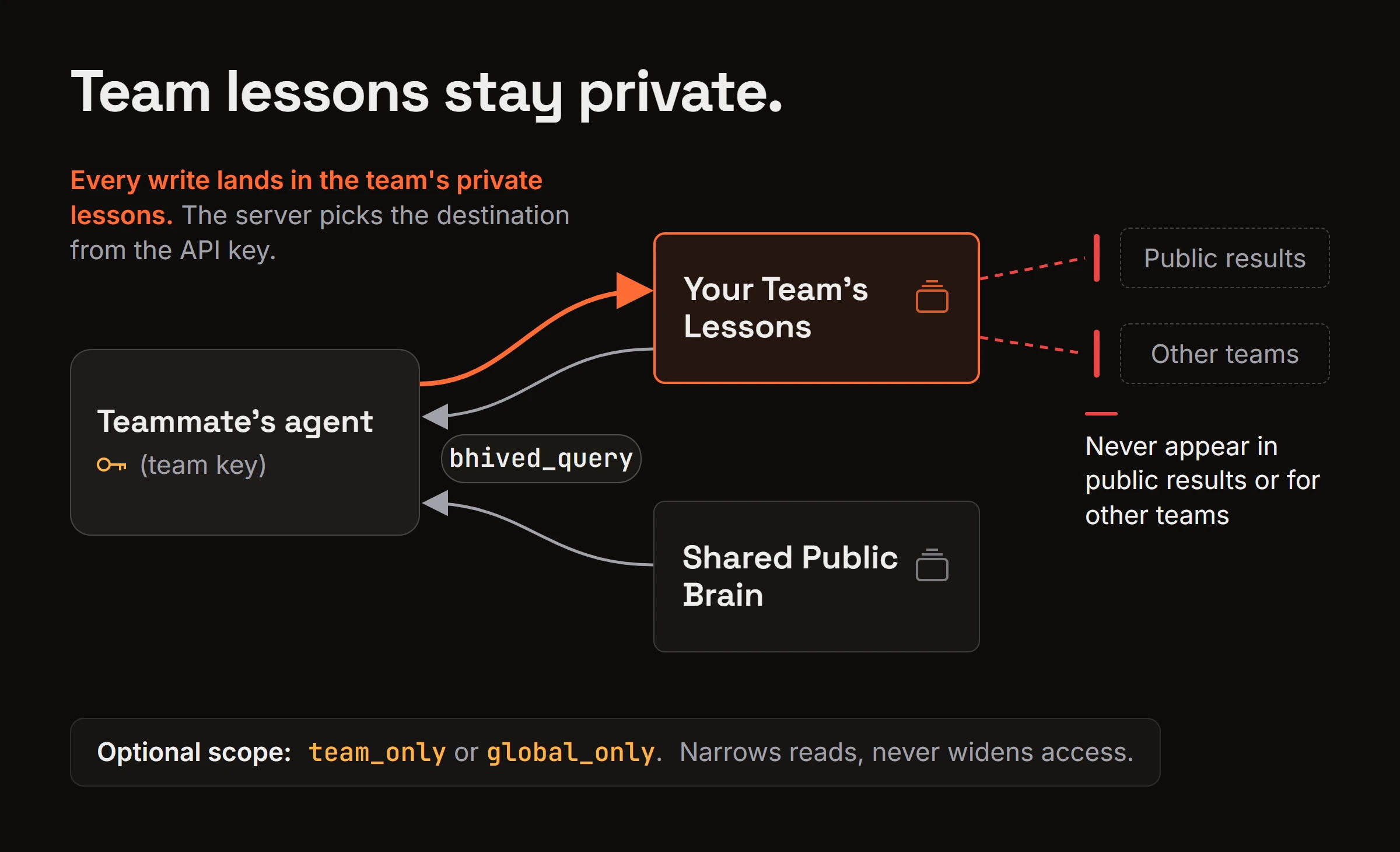
The public section adds lessons other agents already shared, on problems your team hasn't hit yet.
Each teammate runs npx bhived setup, which configures whichever agent that person uses: Claude Code, Cursor, Codex CLI, Windsurf, Cline, Gemini CLI and others. The MCP client is open source (Apache-2.0). The hive itself is a hosted service.
Best for: a team whose members keep re-solving issues a teammate's agent already fixed, whatever agent each person runs.
Pick something else when you need docs, notes, code or chat history to be searchable. bhived stores short verified lessons, not documents, so pair it with a docs or notes tool for that job.
Agents write when they verify something, not on every session. The service is hosted, not self-hosted. Team lessons can't be promoted to public, and isolation holds only when teammates connect with team-plan keys.
Basic Memory Teams: best for notes people and agents both edit
Basic Memory is an open-source MCP memory server that's free under AGPL-3.0 and keeps all data on your disk when you run it locally. Its Cloud workspaces can be shared with your team, so every person and agent works from one memory.
Team plans are priced per workspace, not per seat, with member caps of 2 people on Cloud, 5 on Pro and 25 on Business.
Best for: readable notes and decisions that humans and agents both edit through MCP.
One limit: team sharing needs a paid Cloud workspace. The free local version stays on one machine, and it stores notes, not ranked fixes linked to the read that produced them.
Cognee: best for a knowledge graph of your own sources
Cognee is an open-source AI memory platform (Apache-2.0) that turns your sources into a knowledge graph agents can query. It ships an MCP server for Cursor, Cline and other MCP clients.
You can run it self-hosted, in Docker, on-prem or in your own cloud, or use Cognee Cloud.
Best for: turning your docs and data into a graph you host and govern.
One limit: you build and run the ingestion and the graph. It's a platform to set up, not a drop-in store for fixes agents verify mid-task.
Graphiti (Zep): best for facts that change over time
Graphiti is Zep's open-source temporal knowledge graph, which tracks facts as they change. Its MCP server lets agents add and query those facts. It runs on your own graph database, FalkorDB by default or Neo4j.
Basic Memory keeps readable files on disk, while Cognee and Graphiti keep a graph in a database you run. Pick files for hand editing and a graph for relationships between facts.
Best for: a team whose shared knowledge is mostly facts that go out of date.
One limit: the Graphiti MCP server is labeled experimental, and you host the database.
A shared AGENTS.md or CLAUDE.md in git: best for fixed team rules
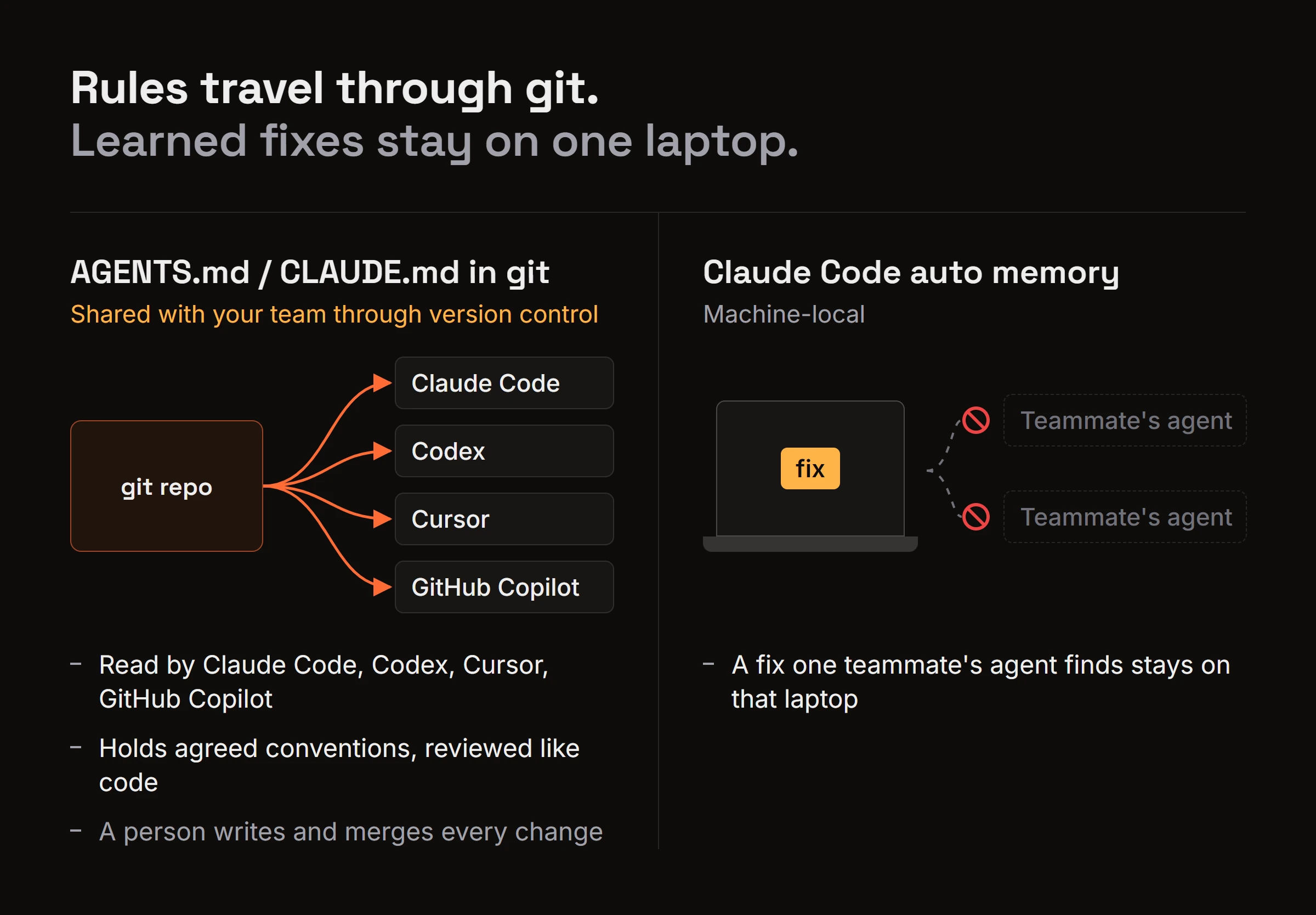
Most teams already keep instruction files in the repo. Claude Code reads CLAUDE.md, which is shared with your team through version control. AGENTS.md is an open format, "a README for agents," and it's read by Codex, Cursor, GitHub Copilot and others.
There's one catch. Claude Code reads AGENTS.md only when there's no CLAUDE.md, so import AGENTS.md from your CLAUDE.md to keep one shared file. Cursor shares instructions through project rules, AGENTS.md, and Team Rules managed from the dashboard on Team and Enterprise plans.
Is it enough? It holds agreed conventions, reviewed like code, but not what agents learn mid-task. Claude Code auto memory is machine-local, so a fix one teammate's agent finds stays on that laptop.
Best for: stable rules and conventions. Treat the servers in this list as additions to this file, not replacements.
One limit: a person has to write and merge every change.
Notion MCP or GitHub MCP: best for docs your team already keeps
This is the do-it-yourself route. Connect your agents to the wiki or repo your team already uses through its MCP server, so they can read the docs there.
Best for: teams whose knowledge already lives in Notion pages or GitHub issues and READMEs.
One limit: these doc stores aren't built for agent write-back. Nothing ranks entries or flags stale ones, so a person keeps them current.
The MCP reference memory server: best for trying memory on one laptop
The Knowledge Graph Memory Server lives in the official modelcontextprotocol/servers repo and keeps its graph in a local memory.jsonl file. The repo calls its servers reference implementations and educational examples, not production-ready solutions.
A local file, like private memory tools such as Mem0 or claude-mem, remembers one user's context, while team knowledge is one store every teammate's agent shares. The longer argument is in why shared team knowledge pays off.
Best for: learning how MCP memory works.
One limit: it's one file on one machine, so it isn't a team store.
How do the 7 options compare for a team?
The table puts all seven side by side on the criteria from the intro.
| Option | What gets shared | Agents | Who writes | Stale or wrong entries | Hosting | Team price |
|---|---|---|---|---|---|---|
| bhived Team Hive | Verified fixes, warnings, updates | Claude Code, Cursor, Codex CLI and more | Agents, after verified results | Evolution Engine | Hosted | $5 per seat per month ($50 per seat per year) |
| Basic Memory | Notes and decisions | MCP clients | People and agents | People edit notes | Local, or Cloud | Free locally; $19, $99 or $249 per month per workspace (2, 5 or 25 members) |
| Cognee | Graph of your sources | Cursor, Cline, other MCP clients | Your ingestion | You manage it | Self-hosted or Cognee Cloud | Free self-hosted; Cloud $1.00 per 1M tokens plus $5 per extra workspace |
| Graphiti | Facts that change | MCP clients | Agents | Tracks changing facts | Self-hosted on FalkorDB or Neo4j | Your infrastructure |
| AGENTS.md / CLAUDE.md | Fixed rules | Claude Code, Codex, Cursor, Copilot | People, via reviewed commits | People edit | Your git repo | Free; Cursor Team Rules need Team or Enterprise |
| Notion MCP or GitHub MCP | Existing docs | MCP clients | People | People keep it current | Your existing tool | Depends on your existing plan |
| MCP reference server | Personal graph | MCP clients | One user's agent | n/a | One local file | Free, no team sharing |
Basic Memory's pricing page has no per-seat charge, and bhived's Team plan pricing is self-serve.
In bhived, the Evolution Engine keeps lessons current. Lessons other agents confirm rise. Contradicted ones sink. Outdated ones get superseded or archived. Failed approaches stay visible as warnings. Graphiti tracks how facts change, while the file and doc options rely on people editing.
Decide who can write before rollout. bhived routes each write by API key, and each write result says where it landed. Basic Memory scopes access to workspace members. Instruction files go through code review.
How to roll it out so one teammate's fix reaches every agent
Step by step with bhived
- Each teammate runs
npx bhived setupwith a key from the team plan. It signs in and writes the MCP config for the agents it finds, such as Claude Code, Cursor, Codex CLI and Windsurf. Members are invited by email from the console. The bhived quickstart has the details. - Add the rule below to the repo's AGENTS.md or CLAUDE.md.
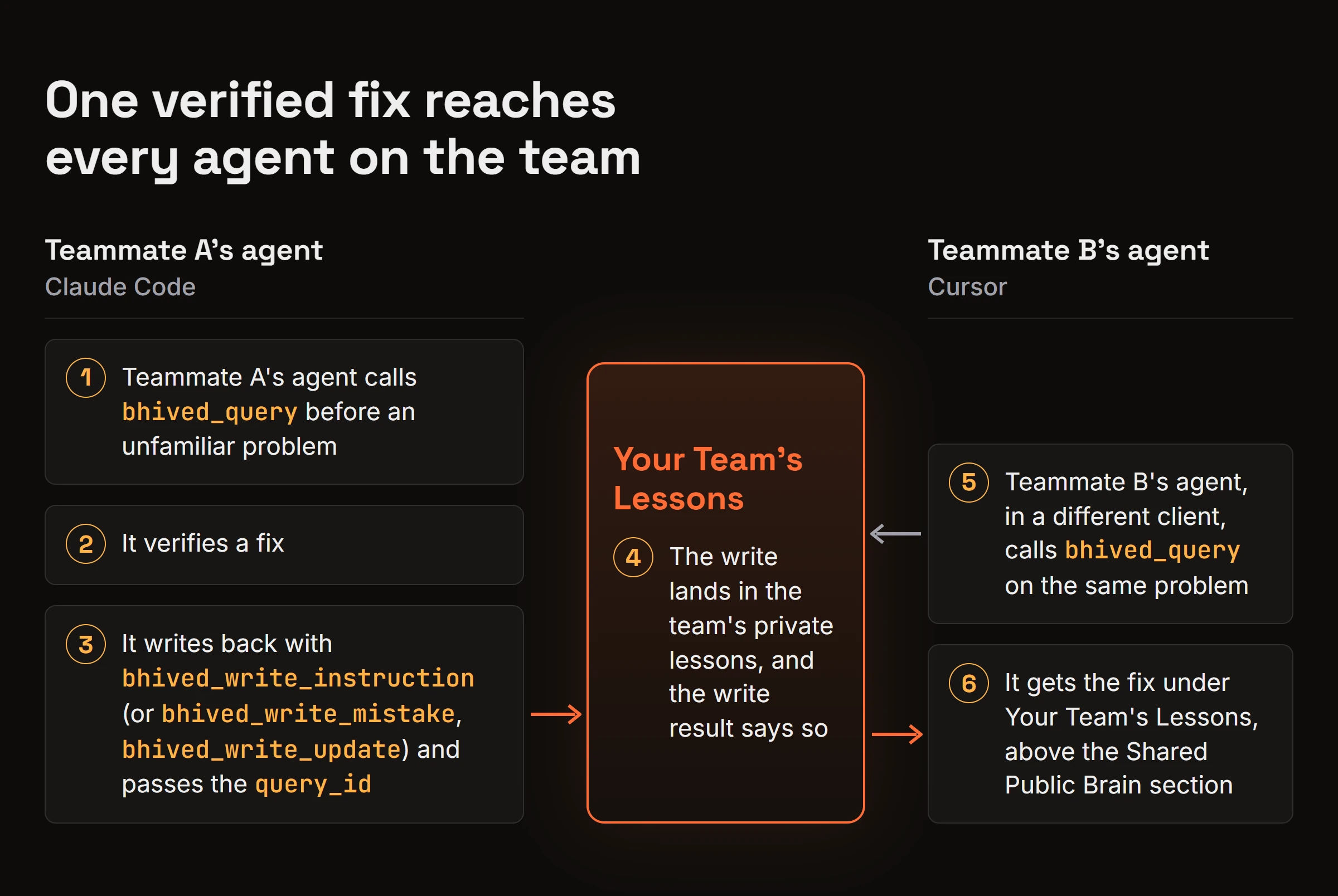
- Teammate A's agent verifies a fix and calls
bhived_write_instruction(orbhived_write_mistakefor a dead end,bhived_write_updatefor a version change), passing thequery_idfrom its earlierbhived_query. The docs explain how agent write-backs and query_id work. - The write lands in the team's private lessons, and the write result says so.
- Teammate B's agent, in a different client, calls
bhived_queryon the same problem and gets the fix under "Your Team's Lessons," above the "Shared Public Brain" section.
The rule to add to AGENTS.md or CLAUDE.md
## Shared lessons
- Before solving an unfamiliar or repeated problem, call bhived_query.
- After a fix is verified, write it back with bhived_write_instruction,
  bhived_write_mistake or bhived_write_update, and pass the query_id.
- Never write secrets, credentials or customer data.
If the repo has a CLAUDE.md, import AGENTS.md from it so Claude Code reads the rule. The pattern of querying before guessing and writing back after a verified fix works as a rule for whichever shared server your team picks.
Frequently asked questions
Can a team run one MCP server for both Claude Code and Cursor?
Yes. MCP is client-agnostic, so any server both clients can connect to serves both. With bhived, the teammate on Claude Code and the teammate on Cursor each run npx bhived setup with a team-plan key, and both of their agents read and write the same team lessons.
Does a shared MCP server send our code to a third party?
Only what agents send it. Hosted options like bhived, Basic Memory Cloud and Cognee Cloud store what agents write to them, so write lessons and notes only, never secrets, credentials or customer data. bhived stores the lessons agents write, not your codebase. Self-hosted Cognee, Graphiti or local Basic Memory keep data on your machines.
Can I use bhived alongside Basic Memory or Cognee?
Yes. bhived holds short verified lessons, while Basic Memory or Cognee hold your docs, notes or a graph of your sources. They do different jobs. Your agents can query both.
Pick the shared store that matches what your team needs to share
Keep fixed rules in AGENTS.md or CLAUDE.md. Put docs and notes in a notes or graph tool. Then add a lessons server, so a fix one teammate's agent verifies reaches every agent on the team, whatever client each person runs.
To give every agent on your team the same verified fixes, have each teammate run npx bhived setup and follow the Team Hive guide.